
So a task I had in a migration project was to copy the SID for the legacy domains users and groups to the new AD domain matching users and groups. First of it is worth pointing out the that MIM is already reading user and groups from the legacy domain and the new domain joining them and syncing passwords from old to new. Writing anything to the SIDHistory is not as simple as taking objectSID of the old user/group and copying it to matching objects SIDHistory in the new domain as SIDHistory is a security sensitive attribute and can be abused to give access that a user shouldn’t have.
At first I looked at deploying ADMT but then I found this series of blog posts about migrating SIDHistory using PowerShell:
How to write (migrate) sidHistory with Powershell (1) – Cloudy Migration Life (migration-blog.com)
How to write or migrate sidHistory with Powershell (2) – Cloudy Migration Life (migration-blog.com)
How to write or migrate sidHistory with Powershell (3) – Cloudy Migration Life (migration-blog.com)
which gave just enough detail that it can be achieved using PS but not giving a complete solution. Happy days I can use my favourite MA again PowerShell MA by Søren yeah and SIDCloner by GreyCorbel Solutions.
First challenge was to get the SIDCloner installed as the Install-Module cmdlet version installed on Windows 2019 server didn’t have a -AllowPrerelease switch which was solved by installing PowerShellGet and upgrading to the latest version. Next up in the challenge list was getting all the requirements in place to use SIDCloner which utilises the DsAddSIdHistory function (which ADMT also uses). The requirements list can be found here.
Schema Script
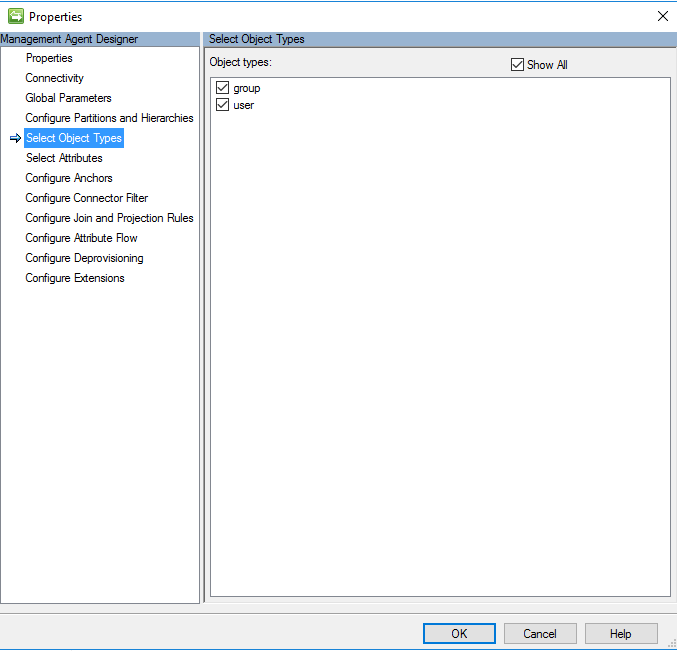
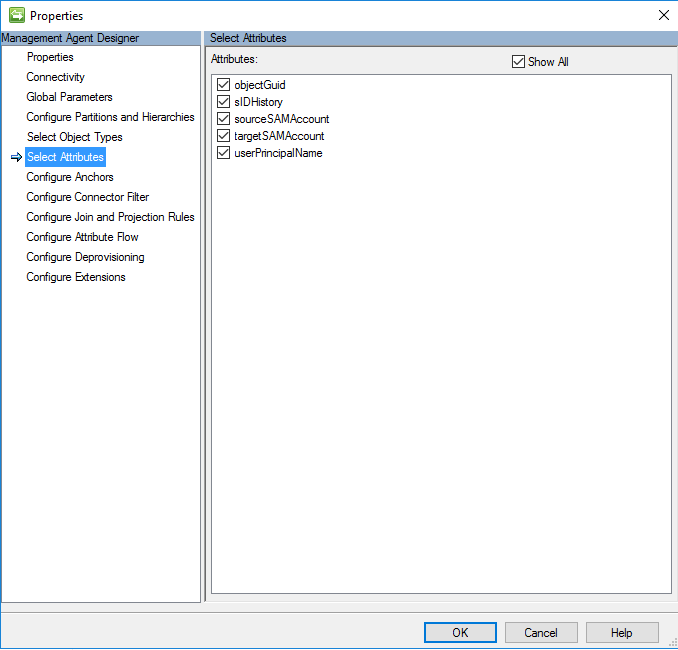
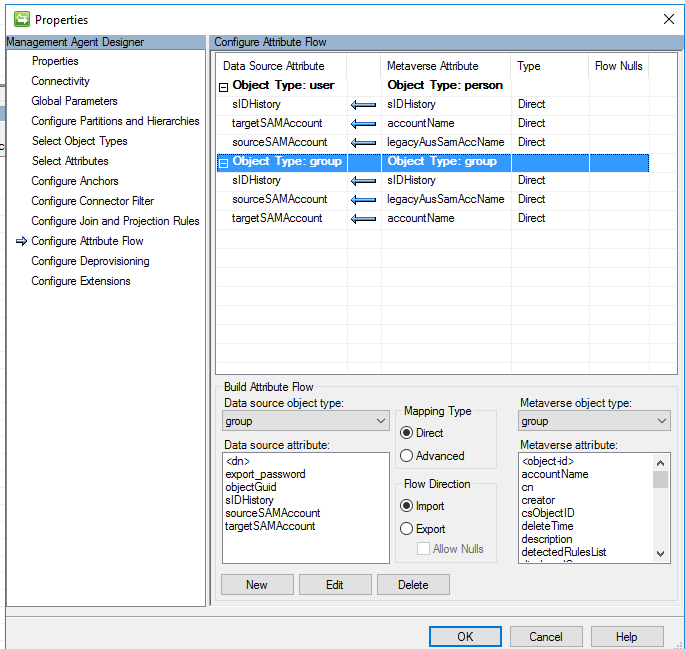
The schema contains the required attributes for both user and group objects. Source and target sAMAccountName are used on the export and sIDHistory is used on the import to confirm that SIDCloner actual did it’s job and the sID and sIDHistory of the source object was written to sIDHistory of the target object.
$obj = New-Object -Type PSCustomObject
$obj = New-Object -Type PSCustomObject
$obj | Add-Member -Type NoteProperty -Name "Anchor-objectGuid|String" -Value "08572d0b-0000-0000-0000-576dd90aa1d9"
$obj | Add-Member -Type NoteProperty -Name "objectClass|String" -Value "user"
$obj | Add-Member -Type NoteProperty -Name "userPrincipalName|String" -Value "bsmith@company.com"
$obj | Add-Member -Type NoteProperty -Name "sourceSAMAccount|String" -Value "Bsmith"
$obj | Add-Member -Type NoteProperty -Name "targetSAMAccount|String" -Value "Bsmith"
$obj | Add-Member -Type NoteProperty -Name "sIDHistory|Binary[]" -Value (0x20,0x20)
$obj
$obj2 = New-Object -Type PSCustomObject
$obj2 = New-Object -Type PSCustomObject
$obj2 | Add-Member -Type NoteProperty -Name "Anchor-objectGuid|String" -Value "08572d0b-0000-0000-0000-076dd90aa1d9"
$obj2 | Add-Member -Type NoteProperty -Name "objectClass|String" -Value "group"
$obj2 | Add-Member -Type NoteProperty -Name "sourceSAMAccount|String" -Value "Bsmith"
$obj2 | Add-Member -Type NoteProperty -Name "targetSAMAccount|String" -Value "Bsmith"
$obj2 | Add-Member -Type NoteProperty -Name "sIDHistory|Binary[]" -Value (0x20,0x20)
$obj2
Import Script
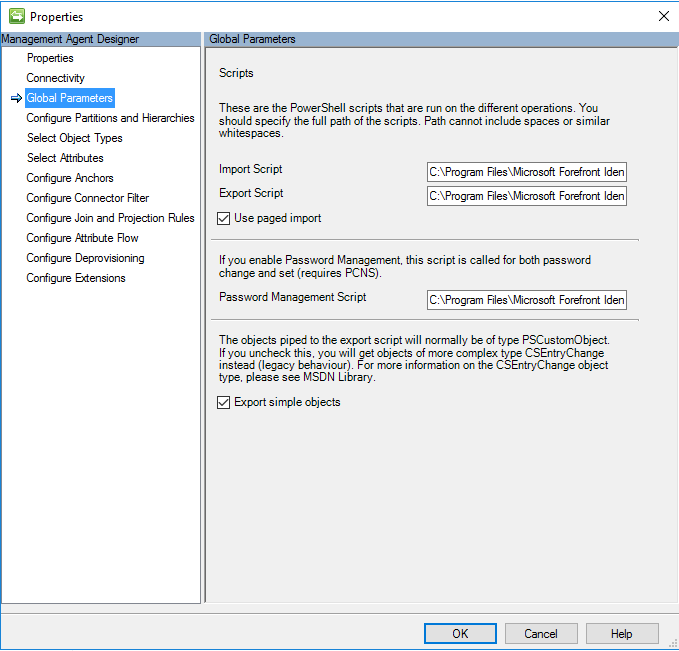
The import script use ADSI to import the user and group objects from the Target AD so that we can confirm the sIDHistory has been updated as expected and is based on the import script from Darren Robison’s post. Strictly speaking an import isn’t needed but a confirming import is good practice.
param (
    $Username,
	$Password,
	$OperationType,
	[bool] $usepagedimport,
	$pagesize,
    $ConfigurationParameter
    )
function Write-toLog
{
    [CmdletBinding()]
    param
    (
        [Parameter(Mandatory = $true)]
        [string]
        $DebugFilePath,
        [Parameter(Mandatory = $true)]
        [string]
        $Text,
        [Parameter(Mandatory = $false)]
        [bool]
        $DebugOn=$true
    )
    Begin {
        if (! $DebugOn) {Return}
        if(!(Test-Path $DebugFilePath)) {
            $global:DebugFile = New-Item -Path $DebugFilePath -ItemType File
        }
        else {
            $global:DebugFile = Get-Item -Path $DebugFilePath
        }
    }
    Process{
            $Text | Out-File $global:DebugFile -Append
    }
    End{
    }
}
#Needs reference to .NET assembly used in the script.
Add-Type -AssemblyName System.DirectoryServices.Protocols
$CookieFile = "C:\Program Files\Microsoft Forefront Identity Manager\2010\Synchronization Service\MaData\Migrate SID\cookie.bin"
$DebugFilePath = "C:\Program Files\Microsoft Forefront Identity Manager\2010\Synchronization Service\MaData\Migrate SID\import_debug_$(get-date -Format "ddMMyyyyTHHmmss").txt"
$WriteToDebug = $true
$debugText = "PS Ver: $($PSVersionTable.PSVersion.Major) "+ " " + (Get-Date)
Write-toLog -DebugFilePath $DebugFilePath -Text $debugText -DebugOn $WriteToDebug
$debugText = "Starting Import as: " + $OperationType + " " + (Get-Date)
Write-toLog -DebugFilePath $DebugFile -Text $debugText -DebugOn $WriteToDebug
#Getting Cookie from file
If (Test-Path $CookieFile -PathType leaf) {
    [byte[]] $Cookie = Get-Content -Encoding byte -Path $CookieFile
}
else {
    $Cookie = $null
}
$splitUserName = $null
if ($username.Contains("\")) {
	$splitUserName = $username.Split("\")[1]
}
if ( $splitUserName -ne $null ) {
	$Credentials = New-Object System.Net.NetworkCredential($splitUserName,$Password)
} else {
	$Credentials = New-Object System.Net.NetworkCredential($username,$Password)
}
$RootDSE = [ADSI]"LDAP://RootDSE"
$LDAPDirectory = New-Object System.DirectoryServices.Protocols.LdapDirectoryIdentifier($RootDSE.dnsHostName)
$LDAPConnection = New-Object System.DirectoryServices.Protocols.LDAPConnection($LDAPDirectory, $Credentials)
$LDAPConnection.TimeOut = New-Object System.TimeSpan(0,20,0)
$Request = New-Object System.DirectoryServices.Protocols.SearchRequest($RootDSE.defaultNamingContext, "(|(&(objectClass=user)(msExchExtensionAttribute35=*@*sourcedomain.com)(!(userPrincipalName=*@EXCLUDEDUPNs.com)))(&(objectClass=group)(!objectClass=computer)(name=G_SOURCEDOMAIN_*)))", "Subtree", @{})
$Request.TimeLimit = New-Object System.TimeSpan(0,20,0)
#Defining the object type returned from searches for performance reasons.
[System.DirectoryServices.Protocols.SearchResultEntry]$entry = $null
if ($OperationType -eq "Full")
	{
		$Cookie = $null
        $debugText = "Full import"+ " " + (Get-Date)
        Write-toLog -DebugFilePath $DebugFile -Text $debugText -DebugOn $WriteToDebug
	} else
	{
        $debugText = "Delta import and we should use the cookie we already found"+ " " + (Get-Date)
        Write-toLog -DebugFilePath $DebugFile -Text $debugText -DebugOn $WriteToDebug
	}
$DirSyncRC = New-Object System.DirectoryServices.Protocols.DirSyncRequestControl($Cookie, [System.DirectoryServices.Protocols.DirectorySynchronizationOptions]::ObjectSecurity, [System.Int32]::MaxValue)
$Request.Controls.Add($DirSyncRC) | Out-Null

$MoreData = $true
$Guids = @()
while ($MoreData) {
    $debugText = "Connecting to LDAP using: `n"
    $debugText += "     DistinguishedName: $($Request.DistinguishedName)`n"
    $debugText += "     Attributes: $($Request.Attributes)`n"
    $debugText += "     Filter: $($Request.Filter)`n"
    $debugText += "     Scope: $($Request.Scope)"
    Write-toLog -DebugFilePath $DebugFile -Text $debugText -DebugOn $WriteToDebug

	Try {
		$Response = $LDAPConnection.SendRequest($Request)
	} Catch {
		$debugText = "Error: $('{0}' -f$_.Exception)"
		Write-toLog -DebugFilePath $DebugFile -Text $debugText -DebugOn $WriteToDebug
		Throw $_
	}
    $debugText = "Result: $($Response.ResultCode.ToString())`n"
    $debugText += "     Number of returned objects $($Response.Entries.Count)"
    Write-toLog -DebugFilePath $DebugFile -Text $debugText -DebugOn $WriteToDebug
    ForEach($entry in $Response.Entries) {
        $DirEntry = $null
        #Check if this GUID already been handled to avoid adding duplicate objects
        If($Guids -contains ([GUID] $entry.Attributes["objectguid"][0]).ToString()){continue}
        # we always add objectGuid and objectClass to all objects
        $obj = @{}
        if ($OperationType -eq "Full") {
            $debugText = ($entry | FL | Out-String)
        }
        else {
            $debugText = ($entry.DistinguishedName | Out-String) + "`n"
            $debugText = $debugText + "`tAttributes: " + ($entry.Attributes | FL | Out-String) + "`n"
            $debugText = $debugText + "`tControls: " + ($entry.Controls | FL | Out-String)
        }
		Write-toLog -DebugFilePath $DebugFile -Text $debugText -DebugOn $WriteToDebug
		$gUIDStr = ([GUID] $entry.Attributes["objectguid"][0]).ToString()
		Write-toLog -DebugFilePath $DebugFile -Text $debugText -DebugOn $WriteToDebug
		Write-toLog -DebugFilePath $DebugFile -Text $debugText -DebugOn $WriteToDebug
        $obj.Add("objectGuid", $gUIDStr)
        if ( $entry.distinguishedName.Contains("CN=Deleted Objects"))
        {
            $debugText = "$([GUID] $entry.Attributes["objectguid"][0]) is a delete`n"
            Write-toLog -DebugFilePath $DebugFile -Text $debugText -DebugOn $WriteToDebug
            $objectClassIndex = ($entry.Attributes["objectClass"].Count) - 1
            $debugText = "ObjectClass Upper Index: " + ($objectClassIndex | Out-String)
            $objectType = $entry.Attributes["objectClass"][$objectClassIndex].ToString()
            $debugText = "ObjectClass Upper Index Value: " + ($objectType | Out-String)
            $obj.Add("objectClass", $objectType)
            # this is a deleted object, so we return a changeType of 'delete'; default changeType is 'Add'
            $obj.Add("changeType", "Delete")
        }
        else
        {
			$debugText = "$gUIDStr is an add`n"
			Write-toLog -DebugFilePath $DebugFile -Text $debugText -DebugOn $WriteToDebug
			# we need to get the directory entry to get the additional attributes since
            Try {
				$debugText = "Searching for Directory Entry: LDAP://$($entry.DistinguishedName)"
				Write-toLog -DebugFilePath $DebugFile -Text $debugText -DebugOn $WriteToDebug
				$DirEntry = New-Object System.DirectoryServices.DirectoryEntry "LDAP://$($entry.DistinguishedName)"
				$debugText = ($DirEntry | Select-Object userPrincipalName,samAccountName,msExchExtensionAttribute30,sIDHistory,objectClass | Out-String)
				Write-toLog -DebugFilePath $DebugFile -Text $debugText -DebugOn $WriteToDebug
			} Catch {
				$debugText = "Error: $('{0}' -f$_.Exception)"
				Write-toLog -DebugFilePath $DebugFile -Text $debugText -DebugOn $WriteToDebug
				Throw $_
			}
            if ($DirEntry.Properties.Contains("objectClass")) {
                $objectClassIndex = ($DirEntry.Properties["objectClass"].Count) - 1
                $objectType = $DirEntry.Properties["objectClass"][$objectClassIndex].ToString()
                $obj.Add("objectClass",$objectType)
                $debugText += "     objectClass: $objectType`n"
            }
            if ($DirEntry.Properties.Contains("userprincipalname")) {
                $userPrincipalNameStr = ($DirEntry.Properties["userprincipalname"][0])
                $obj.Add("userPrincipalName",$userPrincipalNameStr)
                $debugText += "     userPrincipalName: $userPrincipalNameStr`n"
            }
			if ($DirEntry.Properties.Contains("sidhistory")) {
				$sidHistory = @()
                ForEach($sidEntry in $DirEntry.Properties["sidhistory"]) {
					$sidHistory += ,$sidEntry
                    $debugText += "     sidHistory: $sidEntry`n"
                }
				$obj.Add("sIDHistory",$sidHistory)
            }
			if ($DirEntry.Properties.Contains("samaccountname")) {
				$sAMAccountNameStr = ($DirEntry.Properties["samaccountname"][0])
                $obj.Add("targetSAMAccount",$sAMAccountNameStr.ToUpper())
                $debugText += "     targetSAMAccount: $sAMAccountNameStr`n"
			}
			if ($DirEntry.Properties.Contains("msexchextensionattribute30")) {
				$sourcesAMAccountNameStr = ($DirEntry.Properties["msexchextensionattribute30"][0])
                $obj.Add("sourceSAMAccount",$sourcesAMAccountNameStr.ToUpper())
                $debugText += "     sourceSAMAccount: $sourcesAMAccountNameStr`n"
			}
			$DirEntry.Close()
			$DirEntry.Dispose()
        }
        #Add Guid to list of processed guids to avoid duplication
        $Guids += ,$gUIDStr
        #Return the object to the MA
		$debugText = ($obj | Out-String)
		Write-toLog -DebugFilePath $DebugFile -Text $debugText -DebugOn $WriteToDebug
        $obj
    }

    ForEach ($Control in $Response.Controls) {
        If ($Control.GetType().Name -eq "DirSyncResponseControl") {
            $Cookie = $Control.Cookie
            $MoreData = $Control.MoreData
            }
        }
    $DirSyncRC.Cookie = $Cookie
}
#Saving cookie file
Set-Content -Value $Cookie -Encoding byte -Path $CookieFile
$global:RunStepCustomData = [System.Convert]::ToBase64String($Cookie)
$LDAPConnection.Dispose()
#endregion
Export Script
Here is where SIDCloner performs it’s magic as long as all the pre-reqs are in place in both source and target domains. Credentials for the target and source domain service accounts are passed in via the Authentication section of the MA configuration in Username/Password and Username (auxiliary)/Password (auxiliary) fields respectively. Be careful with the format used for these credentials. In my dev environment these had to be in UPN format but in production it only worked in domain/sAMAccountName format.
Other values required in the script are passed via the Configuration parameters:
Source and target domain DNS names, Source and target domain PDC DNS names e.g.
source=ds.source.com
target=ds.target.com
sourcePDC=DC10.ds.source.com
targetPDC=DC01.ds.target.com
PARAM
(
  $Username,
  $Password,
  $Credentials,
  $AuxUsername,
  $AuxPassword,
  $AuxCredentials,
  $ExportType,
  $Schema,
  $ConfigurationParameter
)
BEGIN
{
	if ((get-module -name SidCloner).count -ne 1) {
		Import-Module -Name SidCloner | Out-Null
	}

	$DebugFilePath = "C:\Program Files\Microsoft Forefront Identity Manager\2010\Synchronization Service\MaData\Migrate SID\export_debug_$(get-date -Format "ddMMyyyyTHHmmss").txt"
	"PS Ver: $($PSVersionTable.PSVersion.Major) " + " " + (Get-Date) | Out-File $DebugFilePath -Append
	"Modules: " + (get-module | select -Property Name,Version | Out-string) + (Get-Date) | Out-File $DebugFilePath -Append
	"Configuration Params: " + ($ConfigurationParameter | Out-string) + (Get-Date) | Out-File $DebugFilePath -Append
	"Starting Export as: " + $ExportType + " " + (Get-Date) | Out-File $DebugFilePath -Append

	if ($ConfigurationParameter -ne $Null) {
		$SourceDomain = $ConfigurationParameter['source']
		$TargetDomain = $ConfigurationParameter['target']
]
		$sourcePDC = $ConfigurationParameter['sourcePDC']
		$targetPDC = $ConfigurationParameter['targetPDC']
	}
	$CredPwd = ConvertTo-SecureString $Password -AsPlainText -Force
	$TargetCred = New-Object System.Management.Automation.PSCredential ($Username, $CredPwd)
	"Target User: " + $TargetCred.UserName + " " + (Get-Date) | Out-File $DebugFilePath -Append
	$CredPwd = ConvertTo-SecureString $AuxPassword -AsPlainText -Force
	$SourceCred = New-Object System.Management.Automation.PSCredential ($AuxUsername, $CredPwd)
	"Source User: " + $SourceCred.UserName + " " + (Get-Date) | Out-File $DebugFilePath -Append
	"Source PDC: " + $sourcePDC + " " + (Get-Date) | Out-File $DebugFilePath -Append
	"Target PDC: " + $targetPDC + " " + (Get-Date) | Out-File $DebugFilePath -Append
}
PROCESS
{
	$DN = $_.'[DN]'
	$Identifier = $_.'[Identifier]'
	$ObjectType = $_.'[ObjectType]'
	$ObjectModificationType = $_.'[ObjectModificationType]'
	$sidhistory = $_.sIDHistory
	$upn = $_.userPrincipalName
	$sourceSAMAccount = $_.sourceSAMAccount
	$targetSAMAccount = $_.targetSAMAccount

	[string[]]$objectSIDStr = @()
	ForEach ($sid in $sidhistory) {
		$objectSIDStr += (New-Object System.Security.Principal.SecurityIdentifier($sid,0)).Value
	}
	"`n" | Out-File $DebugFilePath -Append
	"DN: " + $DN + " " + (Get-Date) | Out-File $DebugFilePath -Append
	"Identifier: " + $Identifier + " " + (Get-Date) | Out-File $DebugFilePath -Append
	"ObjectType: " + $ObjectType + " " + (Get-Date) | Out-File $DebugFilePath -Append
	"ObjectModificationType: " + $ObjectModificationType + " " + (Get-Date) | Out-File $DebugFilePath -Append
	"sIDHistory: " + $objectSIDStr + " " + (Get-Date) | Out-File $DebugFilePath -Append
	"UPN: " + $upn + " " + (Get-Date) | Out-File $DebugFilePath -Append
	"Source sAMAccountName: " + $sourceSAMAccount + " " + (Get-Date) | Out-File $DebugFilePath -Append
	"Target sAMAccountName: " + $targetSAMAccount + " " + (Get-Date) | Out-File $DebugFilePath -Append
	"Copy-Sid -SourcePrincipal " + $sourceSAMAccount + " -TargetPrincipal " + $targetSAMAccount +" -SourceDomain " + $sourceDomain + " -TargetDomain " + $targetDomain + " -SourceDC " + $sourcePDC + " -TargetDC " + $targetPDC + " -SourceCredential " + $SourceCred.Username + " -TargetCredential " + $TargetCred.Username | Out-File $DebugFilePath -Append
	$result = Copy-Sid -SourcePrincipal $sourceSAMAccount -TargetPrincipal $targetSAMAccount -SourceDomain $sourceDomain -TargetDomain $targetDomain -SourceDC $sourcePDC -TargetDC $targetPDC -SourceCredential $SourceCred -TargetCredential $TargetCred
	"Result: " + ($result | FL | Out-string) + (Get-Date) | Out-File $DebugFilePath -Append

	$obj = @{}
	$obj.Add("[Identifier]", $Identifier)
	$resultStatus = ($result.Result | Out-string).Trim()
	if ($resultStatus -ne "OK") {
		$obj.Add("[ErrorName]", $resultStatus)
		$obj.Add("[ErrorDetail]", ($result.ErrorDetail | Out-string))
	}
	Else {
		$obj.Add("[ErrorName]", "success")
	}
	$obj
}
END
{
	"End Export " + (Get-Date) + "`n" | Out-File $DebugFilePath -Append
}
MA Configuration
Global Parameters
Object Types
Select Attributes
Attribute Flow
Conclusion
This method works fine for small numbers of objects, but SIDCloner does take ~40 seconds to execute per object and can be prone to errors after running for hours. I had 9000 users and 8000 groups to migrate, which would take a total of 680000 seconds or 7.87 days to complete the initial export! This would mean MIM was tied up for 8 days providing no errors occurred which wasn’t acceptable. To work around this initial load I export the connector space exports to a CSV and then wrote a separate PS script that used Invoke-Parallel which ran 20 threads in parallel and completed the initial export in a few hours.
Happy migrating!
 Boyar Consulting
Leave a comment