
Welcome to the first post looking at building identity joiner, move and leaver processes using Azure Serverless functionality. In this post I will use an Azure function to source basic identity data from The Movie Database (TMDb) using the API in particular the Get Popular function which is updated daily based a popularity rating. Only use the first page of data in this list which will initially provides data for 20 people. The Get Popular function provides the following data and more for each person:
- Department – Actor, Director, Crew, etc.
- Name – Full name
- ID – Unique identifier
- Gender – 1 Female, 2 Male
Having used MIM for years I want an approach that kind of follows the state based design of the sync engine using tables to store data and then use workflows to execute the actions required. This gives most of the benefits of state based and event driven systems.
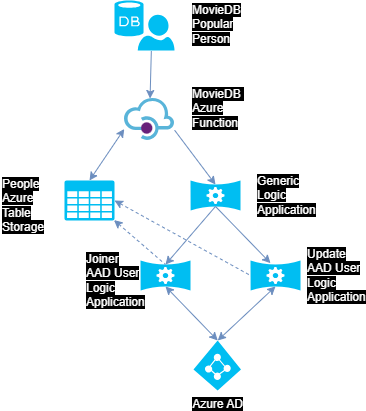
Now I have a source for identities I need a way to keep track of the them as they ebb and flow in and out of the top 20 most popular people. After reading this article by Troy Hunt I decided that Azure Table Storage (ATS) was going to give a fast, low cost method to store this data. Here is the current structure of the table. Partition Key is generated using the first character of the name field.

The MovieDB Azure Functions purpose is to pull data in from The Movie Database and dump that data in the Azure Storage Table. Add a row if it is a new record, update existing records or change status to inactive (I) if the person disappears from the list. The Azure Function requires that some values are set in the local.settings.json:
{
  "IsEncrypted": false,
  "Values": {
    "AzureWebJobsStorage": "UseDevelopmentStorage=true",
    "FUNCTIONS_WORKER_RUNTIME": "dotnet",
    "timerSchedule": "0 0/60 * * * *",
    "MovieDBAPIKey": "[YOUR MOVIEDB API KEY]",
    "Lang": "en-GB",
    "BaseURL": "https://api.themoviedb.org/3/",
    "ImageURL": "https://image.tmdb.org/t/p/original",
    "LimitRtnPages": 1,
    "ASConnString": "DefaultEndpointsProtocol=https;AccountName=[STORAGE ACCOUNT NAME];AccountKey=[YOUR STORAGE ACCOUNT KEY]==;EndpointSuffix=core.windows.net",
    "LogicAppTriggerURL": "[GENERATED URL FROM THE YOUR GENERIC WORKFLOW LOGIC APP]"
  }
}
These changes are batched up using the PartitionKey and once committed to the table for each change in the batch the Azure Function makes a REST call to a general Logic Application workflow passing the following information:
- Operation Start Time – used to compare against the timestamp column in the AST to ensure that only recent changes are processed
- Operation Type – Add, update or delete which is used to determine which workflows to use in the Logic Application
- ATS PartitionKey – used along with the RowKey to find the row that contains the data to be updated
- ATS RowKey
This workflow processes the change and calls other Logic App workflows as required i.e one for add, another for update or delete.
Source code for this Movie DB Azure Function is on GitHub here.
In conclusion, Azure Functions give the flexibility of .NET so you can achieve all the clever stuff needed that can’t be done easily in a Logic App or Power Automate.
In the next blog post I will detail the generic and create an AAD user Logic Apps.

 Boyar Consulting
Leave a reply to Azure Serverless JML – Router Workflow – Boyar Consulting Cancel reply